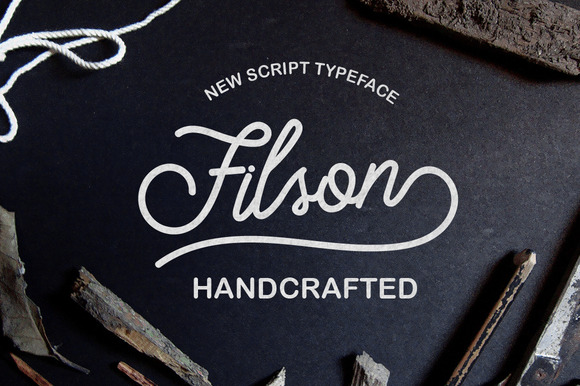
Filson: A Handwritten Marker Font for Practical Design Workflows
When you need to bring a human, organic feel to a project without sacrificing clarity, a well-crafted handwritten font can make all the difference. Filson is a beautiful handwritten marker font designed for versatility and ease of integration. It works across a wide range of applications: signs, invitations, headlines, banners, and both digital and printed materials. What sets Filson apart is its set of elegant swashes, available either through the glyphs panel or as separate SVG files that you can import into nearly any application. This combination of style and flexibility makes it a practical asset for anyone involved in creative work.
Where Filson Fits in a Design Process
Filson is not a one-off decorative typeface; it is a tool that supports different phases of a project. Whether you are planning a brand identity, producing social media graphics, or preparing printed collateral, the font can be used before, during, or after the main design work.
Preparation Phase: Setting the Tone
Early in a project, you often choose a typeface that defines the voice of your communication. Filson’s handwritten marker style suggests warmth, approachability, and a handcrafted quality. If you are designing a flyer for a local crafts fair or a personal note card set, selecting Filson at the outset helps you establish a consistent visual direction. Because it includes both uppercase and lowercase letters with natural variation, you can quickly test headlines and body text without worrying about a rigid, mechanical look.
During Creation: Integrating Swashes and SVG Files
Once you are in the active design phase, Filson’s swashes become a powerful resource. Instead of manually drawing flourishes or adding decorative elements from separate vector libraries, you can access the swashes directly. In applications like Adobe Illustrator, InDesign, or Photoshop, open the glyphs panel to insert swashes that match the font’s exact style. Alternatively, if you prefer to work outside a font-dependent environment, import the individual SVG files into tools like Canva, Figma, or even presentation software. This dual availability means you can use Filson as a drop-in asset without worrying about compatibility.
For example, when creating an invitation, you might type the main text using Filson’s standard characters, then add a swash underneath the headline or beside a border. Because the swashes are provided as separate SVG files, you can scale, recolor, and position them independently—this gives you control over layout without being bound by font rendering limitations.
Final Polish: Quality Control Across Outputs
Before a project goes to print or goes live, checking the consistency of your type is essential. Filson’s handwritten nature includes slight irregularities that are part of its charm, but you still want to avoid awkward spacing or overlapping swashes. Use your software’s character panel to adjust kerning and tracking if needed. If you used SVG swashes, verify that their stroke thickness aligns with the font weight. For print, request a proof to see how the marker texture renders at different sizes. For digital use, test the font on various screen resolutions to ensure readability.
Integrating Filson with Other Tools and Resources
Filson does not exist in isolation; it interacts with the rest of your design toolkit. Understanding how to combine it with other fonts, graphics, and platforms helps you maintain efficiency and consistency.
- Font Pairing: Because Filson is a handwritten display font, it works best when paired with a clean sans-serif for body text. For example, combine Filson for headings with a neutral font like Open Sans or Lato for paragraphs. This contrast keeps the design balanced and readable.
- Vector Editing: The SVG swash files can be opened in any vector editor. You can tweak their curves, combine multiple swashes into a single graphic, or adjust stroke width to match a specific output size. This is especially useful when producing large banners or signs where the font itself might be scaled beyond its designed size.
- Presentation Software: Many professionals need to create slides or pitch decks that feel personal. Import Filson’s SVG swashes and use the font itself for title slides. Because SVG files can be placed directly into PowerPoint or Keynote, you avoid the risk of font licensing issues or missing glyphs when sharing files.
- Web Use: If you are a blogger or small business owner using a website builder like WordPress, Wix, or Squarespace, you can upload the SVG swashes as image elements. For the font itself, use a web font service or self-host the files with proper licensing. This approach gives your online content a handmade touch without loading heavy scripts.
Choosing the Right Project
Filson is not suited for every context. It works best for short, visually prominent text—titles, smaller quotes, or single words. For long paragraphs, the handwritten style can become tiring to read. Reserve Filson for projects where the personal touch adds value: wedding invitations, event posters, product labels, or social media quotes. When you need to maintain strict readability, use it sparingly.
Working with Swashes
The swashes are a central feature of Filson. To get the most out of them:
- Use the glyphs panel to access swashes directly within your font. This keeps everything in one text layer, making it easier to adjust spacing.
- For applications that do not support advanced glyph features, rely on the SVG files. Import them as vector objects and align them manually.
- Create a library of commonly used swash combinations. If you frequently design invitations, you can save a few pre-positioned swash groups and reuse them across projects.
Maintaining Consistency
Because handwritten fonts vary in letterforms, you may want to keep a style guide for your project. Note which swashes you used and where. If you are collaborating with a team, share the SVG files and the font file so everyone works from the same assets. For printed materials, always do a test print to verify that the swashes do not bleed into the text when reduced in size.
Example 1: Creating a Banner
You are a small business owner preparing a banner for a weekend sale. Start by writing the headline “Weekend SALE” in Filson. Use the glyphs panel to add a decorative swash under the word “SALE”. Because the banner will be printed at 24 by 36 inches, scale the entire group as a vector to maintain sharp edges. The SVG swash file can be exported at high resolution without any quality loss. Check that the stroke thickness appears balanced against the font size. The final design looks hand-lettered but remains legible from a distance.
Example 2: Designing an Invitation
A freelancer is designing invitations for a client’s art gallery opening. The main text uses Filson for the names and the word “Exhibition”. Swashes are added as SVG files placed along the left margin to create a flowing border. In Adobe InDesign, the SVG files remain editable, so the client can request color changes. The font’s natural irregularities give the invitation an artistic feel that matches the gallery’s brand.
Example 3: Digital Social Media Graphics
A marketer needs to produce a series of Instagram quotes. Text is typed in Filson, with a swash applied to the first letter of each quote using the glyphs panel. Because the graphics are viewed on mobile screens, keep the font size large and avoid overcrowding. The SVG swashes can be saved as transparent PNGs and reused across multiple posts, saving time while maintaining a cohesive style.
Quality Control and Long-Term Use
Once you have integrated Filson into your workflow, consider how to store and organize the assets for future projects. Keep a dedicated folder for the font files and the SVG swashes. If you work with a team, document which version of the font you are using. Over time, you may build a collection of customized swash modifications that speed up your process.
For quality control, test the font in both digital and printed formats before committing to a large run. Check that swashes do not clip in your software’s preview or export. Because SVG files are resolution-independent, they are particularly reliable for scaling. Use a consistent naming convention for your swashes (e.g., “filson_swash_01.svg”) to avoid confusion when searching.
Filson also holds up well under repeated use because the handwritten marker style does not rely on strict geometric alignment. Minor variations in stroke thickness or letter height are part of its character. This makes it forgiving when you need to tweak spacing or repurpose elements across different mediums.
By treating Filson as a practical component of your design system—rather than a novelty font—you can integrate it smoothly into routine projects. Whether you are a professional designer, a small business owner, or a hobbyist, the combination of a readable handwritten base and versatile swashes gives you a reliable way to add a personal touch without extra effort.